TimeLab
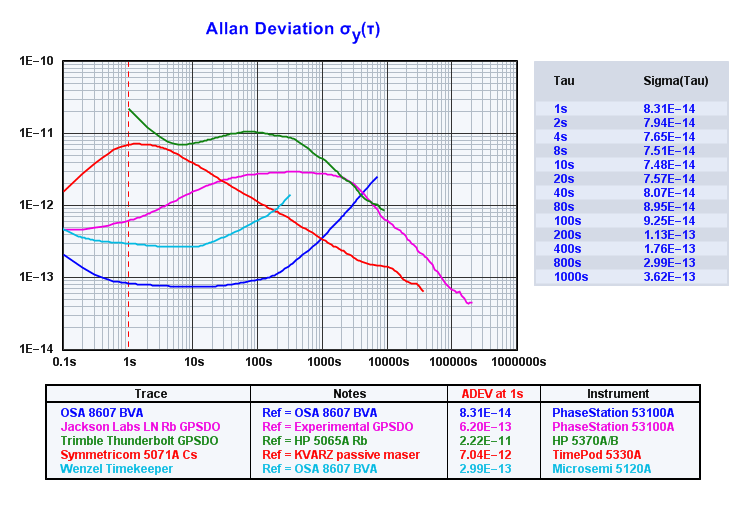
TimeLab makes precision time and frequency measurements, including Allan deviation, MDEV, TDEV, phase noise, and phase/frequency drift.
Support for acquiring, editing, transforming, and displaying data from an extensive selection of instruments is provided by TimeLab, including the Microchip 53100A and Miles Design TimePod 5330A phase noise and frequency stability analyzers, Microchip 5115A/5120A/5125A test sets, and a variety of frequency and time-interval counters.
TimeLab supports 32-bit and 64-bit Windows versions, and requires a CPU with SSE2 support (Pentium 4 or equivalent.)
Download TimeLab 1.700 (Release)
The PhaseStation 53100A User's Manual (5 MB .PDF) serves as a general-purpose guide to TimeLab and all 53100A Phase Noise Analyzer models, including units from Microchip Technologies Inc. and Jackson Labs Technologies.
Application note 53100A-1, Oscillator Measurement and Calibration (680 KB .PDF), is recommended for users new to the Microchip 53100A, along with AN 53100A-2, Dual Reference Noise and Stability Measurements with the PhaseStation 53100A (1.5 MB .PDF).
These notes apply to all 53100A instruments, including those from Microchip Technology Inc. and Jackson Labs Technologies.
See NIST's Handbook of Frequency Stability Analysis for information
on various measurements made by TimeLab, as well as W. J. Riley's comprehensive tutorial, Techniques for Frequency Stability Analysis.
_______________________________________________________
Revision History
V1.700 of 26-Feb-23
- Added File->Export ASCII integrated PN data
- Added Display->Show integrated PN traces
- Trace->Averaging window for phase/frequency difference traces now uses a symmetrical averaging filter, improving both visual quality and rendering performance
- Removed upper limit on frequency count chart averaging interval (previously 30K seconds)
- Added FileExportASCIIData(), AcqReadPMNoiseFloor(), and AcqReadAMNoiseFloor() functions
- Added AcqFreqErr() and AcqFreqMHz() functions to access frequency count readings at user-specified averaging intervals
- Added ScriptSetWindowPos(), DisplayShowIntTraces(), DisplayNoiseMarkers(), and DisplayPlotVisibility() functions
- Exported spur tables as well as JavaScript spur table functions now take user-specified PN gain/AM gain settings into account
- All counter acquisition dialogs now support negative phase scale factors
- Fixed bug that could cause a crash when attempting to refresh deviation traces for a plot that was acquired with stability measurements disabled
- Microchip 53100A updates and enhancements:
- Support added for Option IR (dual 100 MHz internal reference module) and IR/STD (reference module with internal rubidium frequency standard). See Appendix A in the manual for details and application notes.
- Dual-reference measurement roles now use cross Allan deviation by default unless Always use cross ADEV when possible is unchecked in the Additional options dialog
- Added visual aids and additional help text for measurement role selection in acquisition dialog
- Added 53100A_data_export_example.js script to demonstrate usage of FileExportASCIIData() function
- Added 53100A_IR_test.js script to validate Option IR and IR/STD performance against specified limits
V1.621 of 17-Sep-22
- Added save command to TSERVE to support .tim file output
- Added Record length field to Edit->Trace properties dialog, allowing phase records to be trimmed manually after acquisition
- Microchip 53100A updates and enhancements:
- Fixed bug that caused device selection issues in test scripts using multiple 53100As
- Fixed bug that could cause certain 53100A units to fail to restart when cycling power at high operating temperatures. Select Additional Options->Update firmware in the acquisition dialog and install 53100A_116.bit if you encounter this issue.
V1.600 of 18-May-22
- Support added for single-point mask limit lines
- Migrated release notes to https to avoid browser security warnings
- The most recently-used spur identification range is now retained by the Edit->Apply notch filter to phase data dialog box
- Set default range button in the notch filter dialog populates the search range based on the selected plot's sample interval
- Added option to Edit->Trace properties and 53100A acquisition dialogs to specify graph boundaries manually for ADEV and other stability plots
- New Acquire->Acquisition options dialog supports option to automatically save .TIM files periodically during measurement
- Moved Acquire->Configure deferred acquisition to new acquisition options dialog
- Phase noise graph autoscaling is now limited to a minimum of -200 dBc/Hz, in order to lessen the effect of trace variance during early measurement stages
- Added ability to pass parameters to scripts launched from the TimeLab[64].exe command line. See new 53100A_command_line_example.js script for details
- Minimum spur offset frequency setting in Edit->Trace properties and 53100A acquisition dialogs now applies to instrument spurs as well as actual DUT spurs. Spurs below this offset frequency are not flagged or removed from plot
- Mask limit lines are now rendered atop the graticule, rather than beneath it
- Added ScriptParamCount(), ScriptStrParam(), ScriptNumParam(), FileExitApplication(), and FileExists() functions
- Added DisplaySpotTau(), DisplaySpotTime(), DisplaySpotOffset(), DisplaySpotLowerOffset(), and DisplaySpotUpperOffset() script functions
- Minimum supported sample interval for ASCII phase/frequency data import reduced from 1E-6 seconds to 1E-9 seconds
- In order to enforce monotonicity at increasing tau intervals, spline interpolation is no longer used for MTIE plots
- TCP/IP support added for Picotest U6200A-series counters
- Increased input frequency limit to 100 THz in GPIB counter drivers
- Added Display->Restore selected trace color, which reverts changes to the selected trace's color without restoring any other default colors
- Fixed bug that kept the Display->Refresh (F5) command from recalculating deviation trace boundaries under certain conditions
- Fixed bug that could cause lockups when editing phase records in cross ADEV measurements
- New Display->Set spot cursor positions dialog allows spot and integration cursors to be placed at arbitrary X-axis locations
- The Masks menu now permits up to five masks to be displayed at a time, rather than three
- Left-clicking on a row in the legend table will now select the corresponding plot. Previously, only the arrow and +/- keys could be used to change the selected plot.
- Added the ability to remove individual spurs and other undesired features from AM/PM noise traces manually. To flatten a desired trace segment, shift-left drag to mark its left and right endpoints, then select Edit->Flatten selected noise region (Ctrl-F8).
- Changed the hotkey for Display->Clear noise markers from F3 to ctrl-F4 to prevent inadvertent selection
- Fixed bug that could cause File->Load .TIM file to fail to read files containing only AM noise records
- Fixed bug that caused blank PN traces to be displayed under certain conditions when viewing files acquired from Microchip 51xxA test sets by older versions of TimeLab
- TimeLab version update checks are no longer performed during script execution
- TSERVE remote access server updates:
- Added support for multichannel stability measurements, e.g. /ch:1-2,2-3,3-1 to obtain phase data for three-cornered hat measurements
- Added /inputfreq: option to flatten phase slopes by specifying the nominal DUT input frequency
- Added /roundfreq: option to increase nominal DUT input frequency-rounding precision; e.g., 10.23 MHz phase slopes can be flattened with /roundfreq:0.01
- Added /timestamp:UNIX option to output sample timestamps based on Unix epoch (1-Jan-1970) at 1 ms precision
- Added new open and close commands to allow output data file to be closed and reopened without restarting TSERVE
- Added show amspectrum and show amspurs commands to TSERVE
- Microchip 53100A updates and enhancements:
- Cross ADEV measurements now result in a single plot by default, rather than two plots that previously had to be saved to separate .TIM files and reloaded together
- Added Additional options -> Enable secondary plots checkbox to acquisition dialog as part of updated cross ADEV functionality. See mouseover help for more information
- Added Additional options -> System power to acquisition dialog, which provides a convenient way to ensure that the desired Windows power plan is active during measurement
- Initial release of 100 MHz dual-channel internal reference (Option IR) support
- Separate masks are now provided for production test and specification limits
- Phase noise specification limits at 5 MHz have been adjusted based on production test statistics. The updated limits are lower by amounts ranging from 5 dB to 9 dB, depending on offset frequency
- Added 53100A_command_line_example.js and 53100A_3_cornered_hat.js example scripts
- Fixed bug that could cause amplitude fields in the legend table to appear several dB too high in measurements near 50 MHz
- Microchip 51xxA phase noise acquisition driver now supports AM noise acquisition when connected to 53100A via TSERVE remote access server
V1.502 of 4-Mar-21
Download
- Added Expand graph limits automatically option for noise measurements in Edit->Trace properties dialog
- Renamed Display->Refresh deviation traces (F5) to Display->Refresh (F5). This command now recalculates the graph boundaries for either noise traces or deviation traces, depending on the selected measurement view.
- Added overrange/underrange flags to frequency count chart
- Added support for MTIE (Maximum Time Interval Error) to the Measurements menu
- Added File->Limit MTIE processing to 10K points option. This option is enabled by default in order to maintain performance when loading or acquiring measurements with large phase records.
- Fixed bug that could cause a blank value to be displayed in the legend table when the spot cursor was placed at the rightmost tau column in an xDEV plot
- Significant mask test upgrades including multilevel menus, parametric limit lines and predefined ITU-T standards masks. See comment header in default_masks.txt for more information. (Hint: select Masks->Edit mask definitions to open your existing masks.txt file, then use Notepad to view default_masks.txt in the same directory.)
- Increased maximum number of mask definitions from 80 to 128
- Added Display->Edit selected trace color menu shortcut
- Added Display->Phase/frequency X axis labels in Hh / Hh:Mm format
- Added Display->Tau labels in scientific notation
- Added optional mask number parameter to MaskSelect(), MaskResultValid(), and MaskResultMargin() functions
- Mask Result and Mask Margin legend field contents are now color-keyed to their corresponding limit lines when more than one mask is selected
- Added TraceSuppressSpurs(), TraceShowOriginal(), TraceShowHatStatistics(), and TraceShowCrossStatistics() functions
- 53100A-specific updates and enhancements:
- Replaced acquisition dialog fields for PN/jitter scaling with easier-to-use "External frequency conversion" controls that support external mixers and frequency dividers directly. See mouseover help for more information.
- Moved PN Gain and AM Gain controls to the Additional Options dialog
- Added Expand graph limits automatically option for noise measurements to the Additional options dialog
- Added FINE_53100A_PN.TXT segment table, which can be selected to trade off measurement time for increased spur resolution
- Fixed a cosmetic issue in the confirmation dialog box for segment table selection
- Fixed issue that could create an invalid spur table entry at 0 Hz in noise plots
- The TSERVE remote access server now ignores unsupported 512xA commands such as control take and control yield, rather than reporting syntax errors
- Added /duration:<secs> option to force TSERVE to exit after the specified number of seconds
- Added support for optional cross ADEV stability measurements, reducing the ADEV measurement floor to less than 7E-15 @ t=1s at the expense of bin resolution
V1.51 of 5-Jun-20
- Added support for MD 5004A Phase Difference Monitor
- PhaseStation 53100A updates and enhancements:
- Updated USB driver to avoid signature verification issue reported during installation of previous release on certain Windows 10 x64 systems
V1.5 of 29-Apr-20
- Added a visible indicator that appears when Trace->Show imaginary part of cross spectrum is enabled
- PhaseStation 53100A updates and enhancements:
- Fixed bug that could display incorrect input/DUT properties in the legend table when noise measurements were made with stability measurements turned off
- Updated icons, help text, and menu entries for distribution through Microchip Technology Inc.
V1.402 of 16-Nov-19 (Beta)
- Added support for N-cornered hat traces to File->Export ASCII xDEV trace
- The Masks menu now permits up to three masks to be selected, rather than only one at a time
V1.401 of 25-Oct-19 (Beta)
- Error-checking improvements in Microchip 51XXA phase noise acquisition driver
- PhaseStation 53100A updates and enhancements:
- Added TSERVE remote access server. See AN53100A-3 (700 KB .PDF) for more information
- Added help text for Additional options -> Spur min offset field in acquisition dialog
V1.4 of 3-Oct-19
- Release build for PhaseStation 53100A support
V1.39 of 30-Sep-19 (Beta)
- Fixed bug that prevented TCP/IP connection errors from being reported by Symmetricom/Microsemi/Microchip 512X driver
- PhaseStation 53100A updates and enhancements:
- Added 53100A_performance_test.js test script
- Phase-difference slope is now compensated for initial measurement error in all frequency specification modes, including rounding. Consequently the two-port residual test role is no longer necessary, and has been removed.
- For improved acquisition reliability, overlapped FFT processing is now turned off by default in new TimeLab installations. Users who require faster measurement at low noise levels may enable overlapping on the 'Additional options' page of the PhaseStation acquisition dialog.
V1.38b of 24-Sep-19 (Beta)
- PhaseStation 53100A updates and enhancements:
- Fixed issue that could prevent square-wave signals from being recognized
- Avoid rendering wideband segments for carrier frequencies under 2 MHz
- Added support for 5 Hz BW/1 sample per second rate
V1.38a of 19-Sep-19 (Beta)
- Fixed issue that could affect the visual appearance of certain spurs near noise segment boundaries
- Added the ability to specify a minimum offset frequency below which spurs will not be recognized (Edit->Trace properties->Min Spur Offset)
V1.38 of 11-Sep-19 (Beta)
- Noise markers now support user-specified gain offsets and PN carrier frequency rescaling
- PhaseStation 53100A updates and enhancements:
- Simplified channel selection UI in acquisition dialog by replacing DUT/reference type selection with checkbox
- Predefined 3-cornered hat measurement role now supports concurrent AM/PM noise measurements
- In multichannel measurements, the frequency count chart now supports all stability measurement channels rather than only the first
V1.37 of 1-Sep-19 (Beta)
- Increased resolution of MJD timestamps in exported ASCII files
- Added File->Exported ASCII files include headers for Microchip TimeMonitor option
- Added Trace->Show original traces in N-cornered hat display (F6) option
- Added default noise markers for new installations at decade boundaries from 0.1 Hz to 1 MHz
- Minor UI updates
- PhaseStation 53100A updates and enhancements:
- Added support for 32-bit Windows installations
- Fixed an issue with channel selection when changing measurement roles in the acquisition dialog
- Clarified frequency drift error messages
V1.36f of 27-Aug-19 (Beta)
- Added support for up to 10 individual noise markers on PN and AM noise plots (Shift-left click to toggle, F3 to clear)
- Trace->Phase/frequency traces begin at zero (z) now maintains separate settings for phase- and frequency-difference traces
- Added File->Confirmation prompts default to Yes option
- For convenience, the trace caption is now used to provide a default filename when saving newly-acquired plots
- Increased the displayed precision of close-in offset frequencies at the mouse cursor location
- Fixed an issue that could cause brief mouse clicks to be ignored on slower PCs
- Added the ability to specify a JavaScript (.js) file on the command line for execution when TimeLab is launched
- PhaseStation 53100A updates and enhancements:
- Added new segment definitions to extend coverage down to 0.001 Hz offsets
- Added support for 5 kHz and 50 kHz bandwidths for stability measurements with drift-prone sources
- Fixed a bug that could cause validation errors when specifying frequencies manually in the acquisition dialog
V1.36d of 16-Jul-19 (Beta)
Download
- Test release for PhaseStation 53100A support (preproduction)
- Fixed USB-related bug that could cause acquisition failures on certain systems
- Added data overrun checks to prevent close-in noise floor degradation on slower PCs
- Increased USB and FFT buffer sizes for more reliable operation on slower systems
- Fixed bug that could cause synchronization errors when gated-dithering option enabled
- Other minor updates and bug fixes
V1.35c of 19-Jun-19 (Beta)
- Test release for PhaseStation 53100A support (preproduction)
- Improved rejection of instrument spurs in noise measurements
- Simplified input configuration options and added various error checks
- Enabled support for 5 Hz ENBW option
- Amplitude and frequency drift detection enabled
- Common-mode drift correction enabled
- Jitter and PN rescaling enabled
- Various bug fixes
V1.34 of 14-May-19 (Beta)
- Replaced Legend menu functionality with new Legend->Select... dialog
- The most recent phase scale factor applied in Edit->Trace properties is now displayed next to the dialog field
- Added File->Warn before retriggering measurement in progress to avoid data loss when ctrl-A or ctrl-K is inadvertently pressed
- Test release for PhaseStation 53100A support with extensively-revised (final beta) acquisition dialog
V1.33a of 29-Apr-19 (Beta)
- Test release for PhaseStation 53100A support (preproduction)
- Enabled support for PSRAM FIFO to avoid USB dropouts
- Firmware update option added to acquisition dialog
- Various bug fixes
V1.32 of 18-Feb-19 (Beta)
- Initial test release for PhaseStation 53100A support (preproduction)
V1.31 of 18-Sep-18 (Beta)
Download
- Avoid using Unicode minus signs when running under Wine
- TimePod 5330A updates and enhancements:
- Fixed bug that could cause incorrect spur table amplitude entries to be reported when Hann window option selected
V1.30 of 15-Jan-18 (Beta)
- TimePod 5330A updates and enhancements:
- Fixed bug that could cause stream.exe to report incorrect frequency readings on units with option W76
V1.29 of 6-Sep-16 (Beta)
- Executable and setup programs are now signed with a SHA2 certificate to avoid security warnings at installation time due to SHA1 deprecation
- Added Display->Restore default colors
- Acquisition errors with GPIB counters no longer cause previously-acquired data to be lost
- Maximum phase record length when importing or acquiring data from files or talk-only counters increased from 10M to 100M points in 64-bit version
- Added a few options (setup string, data format, comment prefix, and multichannel support) to the talk-only and file-import dialogs
- Added user command fields to Symmetricom 5115A/5120A/5125A PN dialog
- Fixed UI dialog bug that could occur when deleting the underlying .tim file for a modified/unsaved plot
- Fixed mouse cursor label when zooming into a noise plot (df instead of dt)
- Added FileExecuteWait() script command
- TimePod 5330A updates and enhancements:
- Frequency-related values are now displayed only if the selected trace has valid input and reference channels (i.e., not a 0-2 plot from an N-corner hat measurement)
- Fixed bug that could cause incorrect input amplitude values to be reported when reference channel assignments were changed from their defaults
V1.28 of 26-May-15 (Beta)
- Fixed potential crash associated with use of non-US ASCII characters in trace captions
- Fixed issues with script execution while application is minimized
- Mask definition file (MASKS.TXT) is no longer overwritten during installation if it already exists
- Notch filter less prone to ringing artifacts with some data sets
V1.27 of 22-Feb-15 (Beta)
- Added Display->Refresh deviation traces to force recalculation of xDEV bin contents and extents. Useful to recompute trace extents when loading or acquiring a long file
- N-cornered hat traces are no longer terminated at the first negative bin value. Negative bins are skipped, but subsequent positive trace segments are rendered normally
- Fixed bug that could cause data corruption during concurrent GPIB acquisitions
V1.26 of 4-Jan-15 (Beta)
- Added Trace->Show separated xDEV variances (N-cornered hat). This feature is investigational.
V1.25 of 7-Dec-14 (Beta)
- HP 5370A/B driver now supports JavaScript automation. New scripts can be created with the Save Measurement Script button in the acquisition dialog and edited with Script->Edit script..
- Added 5370_7day_stability_test.js example script
- Added Display->Phase/frequency X axis labels in Ss format and Display->Phase/frequency X axis labels in Hh:Mm:Ss format
V1.24 of 31-May-14 (Beta)
- Added ability to specify an explicit DUT frequency in the Edit->Trace properties dialog for imported phase noise plots
- A valid input frequency must now be entered explicitly when acquiring or importing data from a frequency counter. Previously, the first reading from the counter or file was treated as the input frequency.
V1.23 of 19-May-14 (Beta)
- TimePod 5330A updates and enhancements:
- Fixed bug that could omit the ADEV chart from reports generated by the 5330A_performance_test.js script under certain conditions
V1.22 of 22-Apr-14 (Beta)
- Added Edit->Subtract global frequency offset (debug mode only)
- Added ability to import .RES files from HP 3048A
- Fixed bug that could generate error messages on DTS 2077 display
V1.21 of 13-Nov-13 (Beta)
Download
- Added Edit->Apply notch filter to phase data
- Added option to disable automatic ID queries for improved compatiblity with certain GPIB counters
- HP 5371A/5372A driver now sets sample and block sizes to 1 at beginning of acquisition
- Improved precision of time cursor display at mouse X coordinate in phase/freq/xDEV measurement views
- Sample intervals entered as fractions of a second are now displayed correctly in the Legend table
V1.2 of 28-May-13
Download
- Moved script, mask, and example .TIM files to the %ALLUSERSPROFILE%\Documents\TimeLab directory. You may wish to use File->Reset all parameters if you have difficulty locating these files in the Masks or Scripts file dialogs.
- Added Acquire->Configure deferred acquisition
- Phase data importers, including the live ASCII file and talk-only GPIB drivers, now support unwrapped phase data
- Improved CPU utilization while idle
- Fixed bug that could cause Display->Edit colors to fail on certain Windows installations
- Default color for trace 9 is now teal (previously gray)
- TimePod 5330A updates and enhancements:
- Added Scripts menu for automated TimePod 5330A test management. See the user guide for more information
- Fixed bug that could cause acquisition errors after updating USB firmware
- Fixed bug that could cause a crash when requesting extremely long measurement durations at high bandwidths
- Experimental support for multichannel acquisition between two or three channel pairs. See the Stability field in the Advanced tab of the acquisition dialog for more.
- Added /logfile parameter and some additional status messages to stream.exe
- Frequency and amplitude coverage limits are no longer checked when Help->Debug mode is enabled
V1.1 of 1-Oct-12
Download
- Added Masks menu. To learn how to define masks for pass/fail testing, select Masks->Edit mask definitions and review the comments in the mask file
- Added support for multiple file selection in File->Load .TIM file
- Fixed bug that could cause an invalid initial phase sample to be recorded by Acquire->Acquire from live ASCII file
- Revised dialog and help text for Acquire->Symmetricom 5115A / 5120A / 5125A (Frequency stability) driver
- Acquire->Symmetricom TSC 5115A / 5120A / 5125A (Phase noise) option no longer crashes if invalid negative offsets are received from the instrument
- Error-bar calculations for ADEV and other statistical plots are now based on sqrt(N/M) for more conservative confidence estimates, where N is the number of phase samples in each bin and M is the bin's tau multiple
- Added Trace->Clip xDEV traces by confidence to suppress display of xDEV bins with large error bars
- Added Sample Interval field to Edit->Trace Properties dialog, allowing phase records to be resampled after acquisition to reduce their size
- If an xDEV trace refresh is in progress when Edit->Trace Properties is used to alter a phase/frequency/xDEV-related property, the refresh operation will be cancelled and restarted with the new value(s)
- Fixed bug that could cause spot-cursor values and mask test results for phase noise/AM noise measurements to vary slightly depending on the TimeLab window size
- Improved compatibility of HP 5371A/5372A driver with earlier HP 5371As
- Added optional timestamp support to ASCII phase and frequency export commands on the File menu
- Fixed bug in Edit->Trace Properties dialog that could cause data corruption during acquisition from a live ASCII file with a nonzero phase/frequency scale factor
- TimePod 5330A updates and enhancements:
- Added stream.exe, a Win32 console application that can be used to record a continuous stream of phase data to a file or transmit it via TCP/IP. See the appendix in the user guide for more information
- Added Acquire->Acquire from TCP/IP streaming server option to support reception of phase data from stream.exe
- Added Treat Warnings as Errors option to Advanced tab of acquisition dialog to allow acquisitions to be aborted when frequency or amplitude drift occurs
- Added Output Decimation field to acquisition dialog to reduce the amount of data generated by long acquisitions
- Added Attenuate Instrument Spurs option to Noise and Jitter tab to improve rejection of internal spurs during phase noise and AM noise measurement
- Improved CPU performance of FFT threads used for phase noise and AM noise measurement by approximately 10%
V1.014 of 15-May-12
Download
- Enabling or disabling Trace->Suppress spurs in noise traces now automatically disables Trace->Smooth noise traces
- Various usability improvements for Trace->Show correlation gain and Trace->Show FFT segment filter slopes
- TimePod 5330A updates and enhancements:
- Significantly improved phase noise and AM noise measurement time. Traces now reach 1 Hz in less than 30 seconds, 0.1 Hz in 8 minutes, and 0.01 Hz in 30 minutes
- The default segment table now supports phase noise and AM noise measurements down to 0.01 Hz. (If you've made any changes to the segment table, you may wish to back them up before installing this release.)
- Added Overlapped Acquisition option to Noise and Jitter tab of acquisition dialog. Users with high-performance CPUs can enable this option for faster convergence in low-noise measurements.
- Added AM Gain option to Noise and Jitter tab of acquisition dialog
- The Measurement BW options in the Frequency Stability tab are now decade multiples of 0.5 Hz, with corresponding sample rates of 2, 20, 200, and 2000 points per second. (Previously, these values were constrained to integer fractions of the ADC clock rate.)
- Added error message for cases where CPU performance is insufficient to allow FFT threads to keep up with incoming data
- Added optional 'tag' field that can be used to identify a user-edited segment table with the Legend->Segment table option
- Fixed bug that could cause "Access Denied" errors when attempting to save a modified segment table
- Fixed bug that could cause timeout errors after failure of a previous acquisition
V1.013 of 10-Apr-12
- Added Trace->Show xDEV error bars to display approximate one-sigma confidence intervals on Allan deviation and other statistical plots
- TimePod 5330A updates and enhancements:
- Input and reference amplitudes displayed in the legend table are now corrected for flatness and reported to 0.1 dB precision. Typical absolute accuracy is +/- 0.5 dB (not guaranteed.)
- Added Cancel common-mode drift checkbox to Advanced tab of acquisition dialog to prevent false drift warnings at 0.5 Hz and 5 Hz ENBW. (A warmup period of at least 30 minutes is still recommended when measuring at these bandwidths.)
- Fixed bug that caused occasional timeout errors at the beginning of acquisition
V1.012 of 3-Apr-12
- This release includes V1.00 of the TimePod 5330A Operation and Service manual (6 MB .PDF)
- Some options on the Trace and Display menus have been reordered for improved consistency with documentation
- Fixed bug that prevented correlation-gain table from appearing in some cases
V1.011 of 2-Apr-12
- For consistency with noise trace levels, the estimated phase noise floor is now raised or lowered by any additional PN Gain value specified in the acquisition dialog or Edit->Trace Properties dialog
- Keyboard shortcuts (Ctrl + and Ctrl -) for Trace->Increase / Decrease averaging window now support the numeric keypad
- TimePod 5330A updates and enhancements:
- Fixed bug that could cause an overrange indication (flashing purple LED) when signals at certain levels near +16 dBm were applied
- User-specified input frequencies in the acquisition dialog now require the reference frequency to be entered as well
- To support custom applications, the TimePod 5330A's FPGA constraints file, USB API, and various related utilities are now included in drivers\TimePod 5330A beneath the TimeLab installation directory
V1.010 of 12-Mar-12
- Added support for the Philips/Fluke PM6680 counter
V1.003 (RC4) of 28-Feb-12
- Added GPIB and LAN connection support for the Agilent 53220A / 53230A counters
- Fixed bug that could cause invalid text to appear in the Elapsed and Remaining legend table columns
- Instrument ID strings for SRS SR620 and Agilent 53200-series counters are now parsed and shortened for improved readability in the legend table
- TimePod 5330A updates and enhancements:
- New USB controller firmware (MD5330A_100.fx2) fixes potential connection problems with USB 3.0 chipsets, including bluescreen faults
- New FPGA firmware (MD5330A_100.bit) fixes bug that could cause timeout errors at the beginning of acquisition
- Firmware upgrade instructions added to preliminary user manual. Users of instruments prior to S/N 55985 should upgrade to the files above.
- If the supplied reference frequency is a multiple of 1 kHz, it's no longer necessary to specify it in the acquisition dialog in order to obtain accurate frequency-count chart displays
V1.002 (RC3) of 15-Feb-12
- Added support for the Picotest/Array U6200A and compatible counters
- Added Legend->Pathname to display the full path to each loaded .TIM file. Legend->Filename now displays only the filename
- Added Legend->Remaining to display the time remaining for any active acquisitions
- Added Legend->Elapsed to display the elapsed time in the current stage of any active acquisitions
- For improved readability, frequency differences are now reported as fractions of the displayed Input Frequency in the legend table for each plot, rather than as fractions of the internal frequency estimate used to determine the phase slope
- Plot duration values are now updated with the actual acquisition duration at the end of each measurement
- Various minor cosmetic changes
- TimePod 5330A updates and enhancements:
- Fixed a bug in the acquisition dialog that disabled the Start Measurement button after selecting Restore Defaults
V1.001 (RC2) of 30-Jan-12
- Fixed some layout issues with Allan deviation and other numeric tables
- Fixed a bug that could cause invalid characters to appear in the last line of the frequency-count chart
- Keyboard shortcut for Help->Check for updates changed to Ctrl-u
- Font size adjustments are reported on status line
- Improved smoothing of phase noise and AM noise traces
V1.000 (RC1) of 18-Jan-12
- Added File->Export xDEV trace to save ADEV, MDEV, HDEV, and TDEV traces to a text file as tau, sigma(tau) pairs, one line per bin
- Added File->Save image to clipboard
- Added File->Reset all parameters, options, and settings at next startup
- Allan Deviation and other sigma(tau) charts now use 1-2-4 tau increments for improved readability
- Frequency count charts now use 1-3-10x averaging periods for improved readability
- Unzoomed phase/frequency traces are now rendered with an autoscaled Y axis which is centered at zero
- Improved display performance on slower PCs and laptops
- Font sizes are now scaled based on the desktop DPI setting
- Added Prologix GPIB-USB support option, which can be disabled in serial-compatible acquisition dialogs to allow access to FTDI serial ports
- Added Trace->Show correlation gain for selected noise trace
- Fixed bug that could cause spurious trace-corruption warnings in xDEV views
- Fixed bug that could generate invalid noise floor and spur data when using Trace->Show FFT segment filter slopes
- Installer now places example .tim files in common application data directory for access by all users, rather than local user data directory
- Various minor cosmetic changes
V0.986 (Beta) of 14-Jan-12
- Expanded auto-scaling capabilities in phase/frequency views, allowing tighter conformance to trace data
- Added Display->Edit colors
V0.985 (Beta) of 13-Jan-12
- Added File->Export AM/PM noise trace to save noise traces to a text file as offset, dBc/Hz pairs (one line per pixel column)
- Added File->Export AM/PM spur table to save spur tables to a text file as offset, dBc pairs (one line per entry)
- Added File->Export to Stable32 option to pass phase data to Stable32 for offline analysis
- Temporary files generated by the TSC 51xxA PN driver are now cleaned up when TimeLab exits
- TimePod 5330A updates and enhancements:
- Added support for hardware option codes
V0.984 (Beta) of 2-Jan-12
- Added driver for GPIB-addressable HP 53131A/53132A and compatible counters
- Added direct COM port support to Acquire->Acquire from counter in talk-only mode
- Added 'Timestamp' data type to talk-only driver to support timestamping counters such as the picPET
- Fixed bug in the HP 5370B driver that could cause crashes with National Instruments GPIB adapters
- The slope direction in the Phase Difference view now matches the sign of the frequency difference, for better compatibility with TSC 5120A and other timing analyzers. As a result, TIC users who need an accurate frequency-count chart will need to use the START channel for the DUT and the STOP channel for the reference.
V0.983 (Beta) of 27-Dec-11
- TimeLab should now run properly from a standard user account, even if a different administrator account was used to install the program
V0.982 (Beta) of 22-Dec-11
- Added driver for Stanford Research Systems SR620 counter. Both GPIB and direct RS-232 connections are supported by this driver.
- Text renderer now supports UTF-8 characters
- TimePod 5330A updates and enhancements:
- CyUSB drivers updated from 3.4.4 to 3.4.7
V0.981 (Beta) of 19-Dec-11
- Added Help->Debug mode command to allow access to certain test features
- TimePod 5330A updates and enhancements:
- Added support for onboard attenuators, allowing input and reference levels to +20 dBm
- Check for excessive error in user-specified input or reference frequencies
V0.980 (Beta) of 5-Dec-11
- TimePod 5330A updates and enhancements:
- Driver now supports both FPGA and USB firmware updates via the Utility tab in the acquisition dialog
V0.979 (Beta) of 30-Nov-11
- Added driver for HP 5335A counter
V0.978 (Beta) of 27-Oct-11
- TimePod 5330A updates and enhancements:
- Added support for evaluation licenses
V0.977 (Beta) of 22-Oct-11
- TimePod 5330A updates and enhancements:
- Driver installation supported for both 32-bit and 64-bit platforms
V0.976 (Beta) of 10-Oct-11
- Native 64-bit executable and .TLL drivers are automatically installed on all Windows x64 systems
- Added Help->Check for updates menu option. TimeLab can be configured to check for new releases on a weekly or monthly basis, every time the program is launched, or only when manually requested. By default, TimeLab will check for updates once per week.